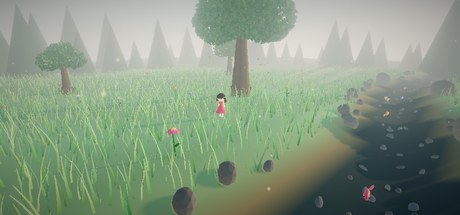
Forest Stroll is a small three.js forest you can walk around in, right in the browser. There are rolling hills, a creek winding down a valley, tens of thousands of grass blades and leaves moving in the wind, flowers, fish, butterflies and a low golden-hour sun. A little girl in a red dress stands by the water; click the ground and she walks there. It runs on three.js r160 and WebGL 2 with no downloaded models or image textures: everything is generated in code at load.
This post walks through how it is put together, with short snippets from the real source: terrain, grass, wind, trees and a walkable 3D scene in three.js without a physics engine or a navmesh.
Renderer, tone mapping and a golden-hour sky
The renderer draws into the page's stage container, set up for a physically lit outdoor scene:
const renderer = new THREE.WebGLRenderer({ antialias: true });
renderer.setPixelRatio(Math.min(devicePixelRatio, 1.75));
renderer.shadowMap.enabled = true;
renderer.shadowMap.type = THREE.PCFSoftShadowMap;
renderer.toneMapping = THREE.ACESFilmicToneMapping;
renderer.toneMappingExposure = 0.68;
ACES filmic tone mapping rolls off bright highlights instead of clipping them, which matters with the sky in shot; exposure sits well below 1 so the meadow does not wash out.
The sky is three.js's Sky addon, a shader that models atmospheric scattering. We set turbidity and Rayleigh scattering for a slightly hazy afternoon and place the sun only 16° above the horizon, which is what gives the whole scene its warm, long-shadowed look:
const phi = THREE.MathUtils.degToRad(90 - 16);   // sun 16° up: golden hour
const theta = THREE.MathUtils.degToRad(150);
sunDir.setFromSphericalCoords(1, phi, theta);
skyU.sunPosition.value.copy(sunDir);

const pmrem = new THREE.PMREMGenerator(renderer);
scene.environment = pmrem.fromScene(sky).texture;
The PMREMGenerator line is the cheap win: it bakes the sky into a prefiltered environment map, so every MeshStandardMaterial in the scene gets sky-coloured ambient light and reflections for free. On top of that there is a warm DirectionalLight placed along the same sunDir (so the shadows agree with the sky), a 2048 × 2048 soft shadow map covering a 100 × 100 area around the clearing, a blue-over-green HemisphereLight for fill, and exponential fog (FogExp2) in a pale sage tone to dissolve the distance.
Procedural terrain from one height function
Everything in the scene that touches the ground asks one function where the ground is. First, the creek: its centre line is a curve x = cxOf(z) built from two sine waves of different frequency, so it meanders without repeating obviously:
const cxOf = z => 8 + 2.6 * Math.sin(z * 0.045) + 1.3 * Math.sin(z * 0.11 + 1.3);
function terrainH(x, z) {
  const d = Math.abs(x - cxOf(z));
  const rolling = (Math.sin(x * 0.13 + z * 0.07) + Math.sin(x * 0.05 - z * 0.11 + 1.7)) * 0.35
                + Math.sin(x * 0.021 + z * 0.017 + 0.5) * 0.9;
  const flat = ss(3.2, 7.5, d);                 // flatten near the water
  const carve = (1 - ss(0, 4.6, d)) * 1.15;     // dig the valley
  const bank = Math.exp(-((d - 5.6) ** 2) / 3.0) * 0.28;  // slight lip on the bank
  return rolling * flat - carve + bank;
}
Read it as layers. rolling is three overlapping sines for gentle hills. d is the horizontal distance to the creek's centre line, and ss is a smoothstep. Multiplying the hills by flat fades them out near the water so the banks are level; carve subtracts up to 1.15 units right under the creek to make a channel; and bank is a small Gaussian bump about 5.6 units out, which reads as a natural raised edge.
The mesh is a PlaneGeometry(240, 240, 190, 190) rotated flat, with each vertex's height set from terrainH. The same loop also writes vertex colours from d: dark riverbed inside 3 units, sand blending into grass between 3.6 and 5.4 units, and grass with a little sine-based variation in hue and lightness beyond. One computeVertexNormals() call and the terrain is done, with no height map or noise library.
Because terrainH is cheap and deterministic, it also places 160 pebbles in the creek bed, 70 bank rocks, every blade, flower and tree, and the girl's feet. Nothing floats and nothing sinks.
A water ribbon that follows the creek
The water is not a big plane clipped by the terrain. It is a custom BufferGeometry: a strip of 240 rows, each row two vertices placed either side of cxOf(z), so the ribbon bends exactly with the channel:
for (let i = 0; i < rows; i++) {
  const z = waterZ0 + (waterZ1 - waterZ0) * (i / (rows - 1));
  const cx = cxOf(z);
  wPos.set([cx - WATER_HALF, WATER_Y, z, cx + WATER_HALF, WATER_Y, z], i * 6);
}
Its material is a MeshPhysicalMaterial with transmission: 0.92, ior: 1.33 (water's index of refraction), a little thickness and a teal attenuation colour. Transmission makes three.js render the opaque scene into an extra buffer and sample it through the surface, so the pebbles and riverbed show through with a slight bend and tint. It costs more than plain transparency, but it is convincing shallow water for very little code.
The ripples are done on the CPU: each frame the strip's 480 vertex heights are set from three summed sines of position and time, and normals are recomputed. That costs next to nothing. Our stormy ocean post uses the same idea at a much larger scale.
25,000 grass blades in one draw call
Grass is the part people ask about most, and it is mostly one InstancedMesh. A single blade starts as a thin PlaneGeometry(0.085, 1.05, 1, 3) moved so its base is at the origin, then each vertex is shaped:
const yy = p.getY(i) / 1.05;
p.setX(i, p.getX(i) * (1 - yy * 0.85));       // taper to a point
p.setZ(i, p.getZ(i) + yy * yy * 0.32);        // curve forward
const v = 0.5 + yy * 0.65;                    // dark root, bright tip
The dark-to-bright vertex gradient is a cheap stand-in for ambient occlusion in a dense lawn. The material is a double-sided MeshStandardMaterial with vertexColors.
Then 25,000 instances are scattered across a disc of radius 58. Using r = Math.sqrt(Math.random()) * 58 keeps the density even across the disc (without the square root, blades bunch up in the middle), and any point within 4.6 units of the creek is rejected so the water stays clear. Each instance gets a random yaw, a slight tilt, a scale between 0.6 and 1.7, and its own colour through setColorAt. Three.js multiplies the instance colour with the vertex gradient, so every blade has a different green but the same dark-to-light falloff.
The result: 25,000 blades, one geometry, one material, one draw call, with matrices built once at startup.
Wind with onBeforeCompile
We did not write a custom grass shader. Instead, a small helper patches the standard material's vertex shader just after three.js computes the local position, so all of the built-in lighting, shadows and fog still work:
material.onBeforeCompile = (shader) => {
  shader.uniforms.uTime = uTime;
  shader.vertexShader = 'uniform float uTime;\n' + shader.vertexShader.replace(
    '#include <begin_vertex>',
    `#include <begin_vertex>
     float wph = instanceMatrix[3].x * 0.8 + instanceMatrix[3].z * 0.6;
     float wh = max(position.y, 0.0);
     transformed.x += (sin(uTime * 1.7 + wph) + sin(uTime * 2.9 + wph * 1.7) * 0.4) * 0.17 * wh;
     transformed.z += cos(uTime * 1.3 + wph * 1.2) * 0.102 * wh;`);
};
(Simplified slightly: the real helper wraps the instanceMatrix line in #ifdef USE_INSTANCING and takes the amplitude as a parameter.) Three details make it work:
- Phase from position.
instanceMatrix[3]is the instance's translation, sowphis a phase that changes smoothly across the field. Neighbouring blades move almost together, and the motion rolls across the meadow like gusts instead of every blade twitching in sync. - Weight by height. Multiplying by
position.y(0 at the root) keeps each blade planted while its tip swings the furthest. - One shared uniform. Every patched material receives the same
uTimeobject, so one assignment per frame,uTime.value = t, animates the grass and all seven trees' foliage at once.
For leaves the same helper is called with a smaller amplitude (0.07) and the height weighting turned off, so each leaf card shifts as a whole rather than bending.
Trees from cylinders and leaf cards
Each trunk is a stack of two or three tapered CylinderGeometry segments with a small random lean, five flared root cylinders around the base, and a few branches angled toward the canopy, all using a bark texture drawn into a canvas at startup (vertical bezier streaks over brown).
The canopy is another InstancedMesh: a plain 0.62-unit square textured with a canvas-drawn leaf and cut out with alphaTest: 0.45. Alpha testing instead of real transparency means no sorting and correct depth, which is essential with thousands of overlapping cards. The cards are distributed over a handful of spherical clusters per tree, shared out by cluster volume, and placed mostly toward the outside of each cluster so the crown looks full but not solid:
const rr = c[3] * (0.55 + 0.45 * Math.cbrt(Math.random()));
dmy.position.set(c[0] + dir.x * rr, c[1] + dir.y * rr * 0.85, c[2] + dir.z * rr);
Leaves on top of a cluster are tinted brighter and warmer than those underneath, which fakes sunlight filtering through. The big hero tree carries 9,000 leaf cards and each of the six smaller trees 2,200, about 22,200 in all. Behind them, a ring of 90 instanced cones sits 62 to 90 units out; in the fog they read as a distant treeline and give the clearing depth for almost no cost.
Click-to-walk: raycast, clamp, stroll
The camera uses OrbitControls, and both the left and right mouse buttons are mapped to rotate (touch screens have no right button). So the first job is telling a click apart from a drag. On pointerup we ignore the event if the pointer moved more than 6 pixels or the press lasted longer than 700 ms; otherwise we cast a ray from the camera through the click:
raycaster.setFromCamera(ndc, camera);
const hit = raycaster.intersectObject(ground, false)[0];
if (hit) setGirlTarget(hit.point.x, hit.point.z);
Only the terrain mesh is tested, so the raycast stays fast and you can always click "through" the grass to the ground.
setGirlTarget then applies two rules without any navmesh. If the target is within 4.4 units of the creek's centre line, it is pushed back to the bank she is currently on, so clicking across the water sends her to the near edge rather than wading in. And if the target is more than 26 units from the centre, it is pulled back onto that circle so she stays inside the forest. A ring marker is placed at the final point, expands and fades out over 0.9 seconds.
Walking is a few lines in the animation loop. She moves straight toward the target at 2.6 units per second and turns toward it the short way round:
const want = Math.atan2(dx, dz);
let turn = (want - g.heading + Math.PI * 3) % (Math.PI * 2) - Math.PI;
g.heading += turn * Math.min(1, dt * 7);
Wrapping the angle difference into −π…π is what stops her spinning a full circle when the target is just behind her left shoulder. A gait value eases between 0 (standing) and 1 (walking), and everything scales by it: leg and arm swing, a small hop from abs(sin(phase)), a slight forward lean and the bounce of her pigtails. She starts and stops smoothly, and a tiny breathing bob takes over when she is idle. Her height is simply terrainH at her position, so she follows every slope.
Fish, butterflies and falling leaves
The small moving things are all cheap parametric motion, with no simulation:
- Fish. Ten fish, each a squashed sphere with shape-geometry fins, swim along
cxOf(z)with a lane offset and wrap around at the ends of the creek. Each one looks a little way ahead along the curve to face downstream, and its tail swings on a sine. - Butterflies. Six pairs of petal-textured wings fly Lissajous-style loops (different sine speeds on x and z), face their direction of travel and flap fast, never dropping below 0.8 units above the terrain.
- Falling leaves. Sixty leaf cards in one
InstancedMeshfall from the hero tree on an 11-unit cycle, drifting sideways and tumbling, with their matrices rewritten each frame. - Air. 500 additive pollen motes, seven drifting cloud sprites, and four light-shaft planes angled along
sunDirthrough the big tree.
Post-processing: bloom and a colour grade
The frame goes through an EffectComposer chain: RenderPass, then UnrealBloomPass with a modest strength of 0.32 and a high threshold so only the brightest sky and sunlit leaf edges glow, then OutputPass for tone mapping and sRGB conversion, and finally a custom ShaderPass. Because the grade runs after the output pass, it works on display-ready colours, which makes its numbers easy to reason about:
col = mix(col, col * col * (3.0 - 2.0 * col), 0.22);           // gentle S-curve
col += vec3(0.035, 0.018, -0.012) * smoothstep(0.55, 1.0, luma); // warm highlights
col += vec3(-0.018, 0.004, 0.022) * (1.0 - smoothstep(0.0, 0.45, luma)); // cool shadows
It also nudges saturation up by 10% and adds a vignette. Warm highlights over slightly teal shadows make a green-on-green scene feel like late afternoon rather than a default render.
Keeping it light
This is a heavy scene for a web page, so it has to be polite:
- Instancing everywhere it repeats: grass, leaves, falling leaves, pebbles, rocks and the far treeline are each a single
InstancedMesh. - Pixel ratio capped at 1.75. High-DPI phones would otherwise render three times the pixels through bloom and transmission.
- Pausing off-screen. An
IntersectionObserverstops therequestAnimationFrameloop when less than 15% of the stage is visible, and avisibilitychangelistener stops it when the tab is hidden. The page also has a Pause button. - Frame time capped at 50 ms, so after a pause the world resumes calmly instead of jumping ahead.
- A cheap raycast against the ground mesh only, never the instanced foliage.
- Reduced motion respected. The camera's slow idle orbit is off for visitors who ask their system for reduced motion, and it stops for good the first time you left-click, tap or drag with the left button.
Takeaways
- Make one height function the source of truth. If the terrain, the props and the character all sample it, the scene holds together.
- Build the creek first, then the terrain around it. A centre-line curve gives you the channel, the water mesh, the fish paths and the "don't walk into the water" rule in one go.
- Grass is instancing plus a vertex patch. One shaped blade, 25,000 matrices and a few lines in
onBeforeCompilego a long way. - Click-to-walk does not need a navmesh for an open scene: raycast the ground, clamp the target with simple rules, and ease the turn and the gait.
- Light and grade sell the mood. A low sun, a PMREM environment, fog, gentle bloom and a warm/cool grade do as much as any model.
The scene is live at Forest Stroll: click around the meadow, orbit the camera and watch the wind move through the grass. If you liked this, read how we built a stormy ocean in three.js or how we animate a stick figure with two-bone IK.