Storm Ahead is a small real-time 3D scene on our site: a wooden sailing ship riding a heavy swell under a black sky, rain slanting across the camera, sharks and a sea serpent circling, and a crossbowman on the bow you can aim and fire with a left click. It runs in the browser with three.js (r160) and no pre-made models or textures — everything is built in code.
This post walks through how the ocean and the ship's motion work, with snippets from the actual source. The short version: one cheap height function is the single source of truth for the sea, and everything that touches the water — the mesh, the ship, the sharks, the splashes, the crossbow bolts — asks that same function where the surface is.
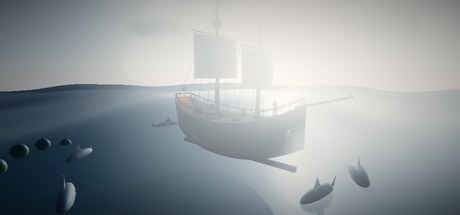
One height function for the whole sea
Real ocean renderers often use FFT spectra or Gerstner waves. We use something much simpler — a sum of five sine waves travelling in different directions at different speeds:
function waveH(x, z, t) {
  return Math.sin(x * 0.055 + t * 0.9) * 1.55
       + Math.sin(z * 0.042 - t * 0.7 + 1.7) * 1.25
       + Math.sin((x + z) * 0.03 + t * 0.55) * 1.85
       + Math.sin(x * 0.14 - z * 0.09 + t * 1.6) * 0.42
       + Math.sin((x * 0.75 - z) * 0.11 + t * 2.1) * 0.22;
}
The first three terms are the swell: long wavelengths, big amplitudes (1.25–1.85 units) and slow speeds, running along x, along z and diagonally. The last two are short, fast chop with small amplitudes on top. Because the directions differ, the peaks never line up into an obvious repeating grid, and the surface looks irregular even though it is completely deterministic.
Why not something more physically correct? Because this function can be called anywhere, any time, on the CPU, and it always returns the same answer for the same (x, z, t). That property ends up mattering far more for the scene than spectral accuracy: it is what lets the ship, the sharks and the arrows agree with the water you see.
Moving the mesh and computing normals
The ocean is a single PlaneGeometry of 520 × 520 units with 112 × 112 segments — 113 × 113 = 12,769 vertices — rotated to lie flat. Every frame we write new heights into it and recompute normals ourselves:
function updateOcean(t) {
  const p = oceanGeo.attributes.position, n = oceanGeo.attributes.normal;
  const e = 0.6;
  for (let i = 0; i < p.count; i++) {
    const x = p.getX(i), z = p.getZ(i);
    const h = waveH(x, z, t);
    p.setY(i, h);
    const hx = waveH(x + e, z, t), hz = waveH(x, z + e, t);
    let nx = -(hx - h) / e, nz = -(hz - h) / e;
    const inv = 1 / Math.hypot(nx, 1, nz);
    n.setXYZ(i, nx * inv, inv, nz * inv);
  }
  p.needsUpdate = true;
  n.needsUpdate = true;
}
The normal comes from finite differences. For a height field y = h(x, z), the surface normal is proportional to (−∂h/∂x, 1, −∂h/∂z). We estimate each slope by sampling the height 0.6 units further along x and along z, then normalise. This is cheaper than computeVertexNormals() (no need to walk triangles) and gives smooth lighting that doesn't depend on mesh resolution.
Is updating ~12.8k vertices on the CPU every frame wasteful? A little — it's three height evaluations per vertex. Moving the same maths into a vertex shader would be faster, but then the sea's shape would live in GLSL as well as JavaScript and the two copies would have to be kept identical. At this mesh size the CPU version is comfortably fast, and keeping one implementation was worth more to us than the saved milliseconds.
Foam on the crests with onBeforeCompile
The water uses a stock MeshStandardMaterial (dark teal, roughness 0.38, a slight metalness) lit by an environment map generated from the sky, so it picks up reflections for free. Foam is added by patching the built-in shader with onBeforeCompile rather than writing a custom material. The vertex shader passes the height through to the fragment shader, which whitens the colour near the crests:
float crest = smoothstep(1.9, 3.7, vH);
float streak = 0.7 + 0.3 * sin(vWp.x * 0.35 + vWp.z * 0.5 + uTime * 0.8)
                         * sin(vWp.x * 0.13 - vWp.z * 0.21 - uTime * 0.5);
diffuseColor.rgb = mix(diffuseColor.rgb, vec3(0.87, 0.93, 0.95), crest * streak * 0.92);
crest is 0 below a height of 1.9 and 1 above 3.7, with a smooth ramp in between, so only the tallest peaks foam. streak breaks the foam into drifting patches so it doesn't look like a uniform white cap. Patching #include <color_fragment> means we keep all of three.js's lighting, shadows, fog and tone mapping.
Making the ship ride the waves
The ship is not physically simulated. There is no rigid body, no buoyancy force, no mass. Instead we sample the sea under the hull and point the ship to match it. Five samples are enough: one at the centre, one toward the bow and stern (±10 along the hull's length), and one each to port and starboard (±4 across the beam).
const hC = waveH(0, 0, t);
const hBow = waveH(10, 0, t), hStern = waveH(-10, 0, t);
const hPort = waveH(0, -4, t), hStar = waveH(0, 4, t);
const k = 1 - Math.exp(-dt * 2.1);
shipState.y  += (hC * 0.85 - shipState.y) * k;
shipState.rz += (Math.atan2(hBow - hStern, 20) * 0.85 - shipState.rz) * k;
shipState.rx += (Math.atan2(hPort - hStar, 8) * 0.8 - shipState.rx) * k;- Heave (up and down) follows the height at the centre.
- Pitch (bow up or down) is the angle of the line from stern sample to bow sample:
atan2(height difference, 20), because the samples are 20 units apart. - Roll (side to side) is the same idea across the 8-unit beam.
Two details sell the weight of the ship. First, each target is scaled down to 80–85%, so the hull never quite matches the full slope of the water — a heavy ship doesn't follow every wave perfectly. Second, the ship doesn't jump to its target; it eases toward it with k = 1 − e−2.1·dt. This exponential smoothing behaves the same at 30, 60 or 144 frames per second (a plain lerp(a, b, 0.05) per frame would not), and it introduces a natural lag: the ship is always slightly behind the wave, as if it had inertia.
Because the hull is a group, the masts, sails, rails, barrels, lantern and crossbowman all inherit this motion automatically.
Bow splashes and other things that touch water
Once the ship's pose is known, we can tell when the bow slams into a wave. We estimate the world height of the bow from the heave and pitch, compare it with the sea height just in front of it, and if the water is more than 0.35 units higher we spawn a big splash sprite — at most once every 0.9 seconds so it doesn't spray continuously:
const bowWorldY = shipState.y + Math.sin(shipState.rz) * 12;
if (t > bowSplashCd && waveH(12, 0, t) > bowWorldY + 0.35) {
  spawnFrom(splashes, _v1.set(13.5, waveH(13.5, 0, t) + 0.5, (Math.random() - 0.5) * 3), 4.5);
  bowSplashCd = t + 0.9;
}
Splashes come from a small object pool of 26 sprites that grow, rise and fade, so nothing is allocated during play. The same waveH call drives everything else in the water:
- Sharks circle the ship at a depth tied to the local wave height, and every 8–15 seconds each one leaps along a half-sine arc, spawning splashes as it leaves and re-enters the water.
- The sea serpent is ten spheres placed along a circle; each segment's height is the wave height plus a travelling hump, so its back appears to roll through the swell, and splashes fire as the head breaks the surface.
- Crossbow bolts fly under simple gravity and count as hitting the water the moment their height drops below
waveHat their position.
The crossbow's aim uses the same "simple and predictable" philosophy. It computes the flight time to the target (distance / speed), leads a moving target by 80% of its velocity times that time, and raises the aim point by ½·g·t² to cancel the drop. That isn't an exact ballistic solution, but at these ranges it lands where you expect.
A hull from a box, sails from a plane
The hull starts as a subdivided BoxGeometry and is bent into a ship shape vertex by vertex. Along the length, the width narrows with a power curve — sharply at the bow, more gently at the stern. A "sheer" curve lifts both ends so the deck sweeps upward at bow and stern, and the bottom is narrower than the top. The deck is a thinner box bent by the same function so it fits exactly.
Sails are subdivided planes pushed outward by sin(πx)·sin(πy)0.7, a smooth billow that is zero at the edges and fullest in the middle. A tiny vertex-shader patch adds two sine waves over time for a gentle flutter, and the red flag at the masthead uses a faster, stronger version of the same trick whose amplitude grows toward the flag's free end. All textures — hull planks, deck, canvas, clouds, splashes, rain — are drawn into canvases at startup.
Selling the storm: sky, fog, rain, lightning, grade
The ocean only looks stormy because of what surrounds it:
- Sky. three.js's
Skyobject with high turbidity and a low sun gives a hazy, overcast dome. A PMREM environment map generated from it lights the water and the ship. - Fog. Exponential fog in a grey-blue tone swallows the horizon, hides the edge of the 520-unit ocean plane and makes the scene feel enclosed.
- Rain. 800 points with a streak texture and additive blending fall at slightly different speeds and slant sideways — positions are updated in a single typed array each frame.
- Clouds. Sprites drift slowly on a ring at least 130 units from the centre, so they can never come between the camera and the ship.
- Lightning. A directional light normally at zero intensity. Occasionally it flashes to full at a random position in the sky, may flicker back up while it is still bright, and decays exponentially (
flash *= 0.03dt). The flash chance is rolled per frame, so lightning is slightly more frequent at high frame rates — a simplification we're happy with. - A warm lantern. One point light at the stern flickers with two summed sine waves. It's the only warm light in the scene and gives the eye somewhere to rest.
- Post-processing. ACES filmic tone mapping at low exposure, a gentle bloom, and a custom grading pass that adds an S-curve for contrast, tints shadows steel-blue and highlights slightly warm, and darkens the corners with a vignette.
Keeping it light
It runs inside a normal web page, so it has to behave:
- Device pixel ratio is capped at 1.75 — high-DPI phones don't need to render at 3×.
- Frame time is capped at 50 ms, so a stalled tab doesn't make the ship lurch when it resumes.
- Bolts, splashes and sparks come from fixed pools; nothing is created during play.
- Rendering stops when the scene scrolls off screen or the tab is hidden, and the camera's slow auto-orbit is turned off for visitors who prefer reduced motion.
Takeaways
- A sum of a few sines is a perfectly good stylised ocean if you choose varied directions, wavelengths and speeds.
- Make the height function the single source of truth. If everything that touches the water samples the same function, everything agrees.
- You don't need physics for a floating ship. Sample bow, stern, port and starboard, derive heave, pitch and roll, damp them, and scale them down slightly.
- Use
1 − e−rate·dtfor frame-rate independent smoothing. - Atmosphere does half the work: fog, rain, a flash of light and a colour grade turn a blue plane into a storm.
The scene is live at Storm Ahead — orbit the camera, aim with the mouse and loose a few bolts at the sharks. Our upcoming survival game Island Escape also ends with a gamble on the open sea, if you like your oceans with stakes.