The stick figure on our stick figure page has no sprite sheet and no animation files. Every frame, a few hundred lines of JavaScript work out where the hips, knees, hands and head should be, and draw the result onto an HTML <canvas>. In its motion lab it walks, runs, does an unarmed throw, jumps and performs a 17-pose spear form, and you can switch between them at any moment without a visible pop.
That page is now a small playable game, Stickman Spear Run: a stickman runner in which the figure carries a long spear and attacks with a two-handed forward thrust while running (Space or ↑ to jump, F or → to strike). The original motion lab stays in as a second mode, so you can still flip through the moves — including the unarmed throw, which exists only there — and watch the skeleton work. This post explains the techniques behind it, using real snippets from the source: two-bone inverse kinematics with the law of cosines, keyframe tracks with easing, foot planting, squash and stretch, and a little verlet physics for secondary motion.
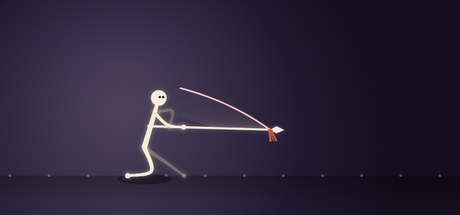
A skeleton made of numbers
The whole figure is a handful of bone lengths in canvas units:
const SPINE=54, NECK=13, HEADR=12;
const UARM=27, FARM=25, THIGH=37, SHIN=37;
const HIP_H=66;      // standing hip height: knees always slightly bent
Note that HIP_H (66) is shorter than THIGH + SHIN (74). The figure never stands with locked knees, which is what makes it look alive even when idle. Because these sizes are fixed, the script scales the canvas instead: it picks a scale so the drawing space is always about 440 units tall, whatever the size of the element on screen. Composition and spacing stay identical on a phone and on a 4K monitor.
Each frame, a function called buildPose(dt) returns a set of screen-space points — pelvis, chest, head, shoulder, hip, both knees, both feet, both elbows and both hands — and a separate draw step renders them. Keeping "where are the joints" apart from "how do we draw them" is what lets us change the art style without touching the motion.
Two-bone IK with the law of cosines
Inverse kinematics answers the question: if the hip is here and I want the foot there, where does the knee go? For a chain of just two bones there is an exact, closed-form answer, and it's only a few lines long:
function ik(root, target, L1, L2, sign){
  let dx=target.x-root.x, dy=target.y-root.y;
  let d=Math.hypot(dx,dy);
  d=clamp(d, Math.abs(L1-L2)+.01, L1+L2-.01);
  const base=Math.atan2(dy,dx);
  let ca=clamp((L1*L1+d*d-L2*L2)/(2*L1*d),-1,1);
  const a=Math.acos(ca);
  const jointAng=base+sign*a;
  return V(root.x+Math.cos(jointAng)*L1, root.y+Math.sin(jointAng)*L1);
}
The complete two-bone solver from stickman.js. It returns the middle joint (knee or elbow).
Here is the reasoning. The thigh (L1), the shin (L2) and the straight line from hip to foot (d) form a triangle. We know all three sides, so the law of cosines gives us any angle:
L2² = L1² + d² − 2·L1·d·cos(a) ⇒ cos(a) = (L1² + d² − L2²) / (2·L1·d)
a is the angle at the hip between the hip-to-foot line and the thigh. The hip-to-foot line points in direction base = atan2(dy, dx), so the thigh points at base ± a. Walk L1 along that direction from the hip and you are at the knee. The sign argument picks which of the two mirror-image solutions you get — knees bend forward, and when both hands hold the spear the near and far elbows use opposite signs so they bend away from each other.
Two clamps make the solver robust:
dis clamped to just inside[|L1 − L2|, L1 + L2]. If the target is out of reach, no triangle exists andacoswould returnNaN. Clamping means "reach as far as you can toward it" instead.- The cosine is clamped to
[−1, 1]. Floating-point error can push it to 1.0000001, which is alsoNaNterritory.
The leg code adds one more safety net before calling ik(): if a foot target is farther from the hip than THIGH + SHIN − 1.5, it is pulled back along the same line. The leg can almost straighten but never fully locks, which avoids the visible "snap" you get when a two-bone chain hits full extension.
Legs use IK, arms mostly use FK
It is tempting to IK everything. We don't. Feet need to be at exact positions — on the ground — so legs are solved with IK. Arms swinging while walking don't have a target; they have a rhythm. For that, forward kinematics (pick angles, compute positions) is simpler and looks more natural:
function armFK(aUp, flex){
  const e=add(shoulder,{x:Math.sin(aUp)*UARM, y:Math.cos(aUp)*UARM});
  const h=add(e,        {x:Math.sin(aUp+flex)*FARM, y:Math.cos(aUp+flex)*FARM});
  return {elbow:e, hand:h};
}
The angle convention here is "0 points straight down, positive swings forward", which makes walking poses easy to think about. During the walk each arm swings opposite to the leg on its side, and the elbow bends more on the forward swing and straightens on the back swing — a small detail that removes the robotic, pendulum look. Arms switch to IK only when the hands have to be somewhere specific: gripping the spear shaft.
A gait cycle in one phase variable
Walking and running are driven by a single number, phase, that loops from 0 to 1. The near foot uses phase and the far foot uses phase + 0.5, so they are always half a cycle apart. A second number, gait, blends from 0 (walk) to 1 (run), and every gait parameter is interpolated by it:
| Parameter | Walk (gait = 0) | Run (gait = 1) |
|---|---|---|
Cadence cyc (cycles per second) | 1.5 | 2.55 |
| Stride length | 44 | 60 |
| Step height | 15 | 26 |
| Duty factor (share of the cycle a foot is on the ground) | 0.62 | 0.40 |
| Hip bob amplitude | 5 | 12 |
The duty factor is the important one. Above 0.5, both feet are on the ground for part of each cycle — that is the definition of walking. Below 0.5 there are moments with neither foot down: a flight phase, which is what makes running look like running. Blending gait smoothly (it eases toward its target every frame) means switching between walk and run never pops.
Each foot's path is split in two. During the stance part (the first duty of its cycle) it slides linearly from half a stride in front of the hip to half a stride behind, flat on the ground. During the swing part it travels forward again along a smoothstep curve, lifted by a half sine wave:
if(pph<duty){ const u=pph/duty; fx=lerp(stride/2,-stride/2,u); fy=groundY; }
else{ const u=(pph-duty)/(1-duty); fx=lerp(-stride/2,stride/2,smooth(u));
      fy=groundY - stepH*Math.sin(PI*u); }
The hip rises and falls twice per cycle (once per step) using -|sin(phase·2π)|; when running, that curve is shifted in phase so the high point lines up with the flight phase. The feet are also pushed slightly forward in proportion to the body's lean so they stay under the centre of mass.
Foot planting: stopping the moonwalk
The figure stays at a fixed spot on screen while the ground scrolls past. If the scroll speed is wrong, the planted foot slides across the ground — the classic moonwalk bug. The fix is one line:
const scroll = stride*cyc/duty; // ground speed = stride × cadence ÷ duty factorWhy does it work? During stance, a foot covers one full stride relative to the hip. Stance lasts duty of a cycle, and a cycle lasts 1/cyc seconds, so stance lasts duty/cyc seconds. The foot therefore moves backward relative to the body at
stride ÷ (duty ÷ cyc) = stride × cyc ÷ duty
If the ground moves backward at exactly that speed, the foot and the ground move together, and the foot is planted. With the numbers from the table, the walk scrolls at 44 × 1.5 ÷ 0.62 ≈ 106 units per second and the run at 60 × 2.55 ÷ 0.40 ≈ 383. Notice that the run is more than three times faster, even though the stride is only a third longer: the shorter duty factor does most of the work. A common mistake is to use stride × cadence, which ignores the duty factor and makes the stance foot drift.
The ground in the scene is a row of soft dots that moves by scroll × dt each frame. When the figure stops locomoting to throw, jump or perform the spear form, scroll drops to zero and the dots stop too.
Keyframe tracks with easing
Throwing and jumping aren't cycles; they are one-off moves with anticipation, action and recovery. For those we use tiny keyframe tracks: arrays of [time, value] pairs sampled at a normalised time p from 0 to 1:
function track(t, keys, ease){
  ease=ease||smooth;
  if(t<=keys[0][0]) return keys[0][1];
  for(let i=0;i<keys.length-1;i++){
    const [t0,v0]=keys[i],[t1,v1]=keys[i+1];
    if(t<=t1){ let u=(t-t0)/((t1-t0)||1); return lerp(v0,v1,ease(u)); }
  }
  return keys[keys.length-1][1];
}
Each animated property gets its own track. For the jump, the body's vertical offset is:
rootY = track(p,[[0,0],[0.2,10],[0.32,-6],[0.5,-160],[0.68,-70],[0.82,4],[0.9,-2],[1,0]],
              (p<0.5?easeOutCubic:easeInCubic));
Read it as a story: crouch down (+10, remember canvas y points down), push off, rise to 160 units at the apex, fall, absorb the landing slightly below ground level, settle. The easing switches halfway: easeOutCubic on the way up (fast launch, slowing toward the apex) and easeInCubic on the way down (slow start, accelerating). That is a cheap but convincing imitation of gravity's parabola.
The spear form takes the same idea further: 18 waypoints (the 17 poses plus a closing key that matches the opening one, so the form loops seamlessly), each describing the whole body — spear angle, grip position, lean, weight shift, crouch, stance width, lift and squash — with an optional easing per segment. Two tricks make it read well. Two identical waypoints in a row create a hold, the freeze-frame "pose" moment of a martial arts form. And thrusts use easeOutCubic, so the spear shoots out fast and decelerates into the pose, which reads as crisp and powerful.
Squash and stretch
The jump also animates a vertical scale, sy: squashed to 0.84 in the crouch, stretched to 1.14 at take-off, squashed again to 0.82 on landing. The horizontal scale is derived from it so the figure seems to keep its volume:
sx = 1+(1-sy)*0.7;     // squash down → get wider; stretch up → get thinner
const pivot=V(anchorX, groundY);
const S=p=>V(pivot.x+(p.x-pivot.x)*sx, pivot.y+(p.y-pivot.y)*sy);
Every joint is passed through S() at the end of buildPose. Scaling around the point on the ground under the figure (rather than its centre) keeps the feet on the floor while the body squashes — exactly what an animator would draw by hand. The head radius is scaled by the average of sx and sy.
Secondary motion: a spring and a verlet chain
Primary motion is what the character does. Secondary motion is what follows — hair, cloth, a head that lags a moment behind the body. It is cheap to add and makes a huge difference. Our figure has two kinds.
A damped spring on the head
The head doesn't sit rigidly on the neck. It is pulled toward its ideal position by a spring (stiffness 260, damping 26), so when the body lurches the head lags and settles with a hint of overshoot. Damping is set low enough to leave a little cartoon wobble.
Verlet hair
The tuft of hair is a chain of four points spaced 9 units apart. Verlet integration stores each point's current and previous position; velocity is simply the difference. That makes the update very short:
const s=scarf[i], vx=(s.x-s.px)*0.86, vy=(s.y-s.py)*0.86;
s.px=s.x; s.py=s.y;
s.x+=vx+windX*dt*dt*60; s.y+=vy+g*dt*dt*60;
The factor 0.86 is air drag. windX is a backward push that grows with running speed (and gets an extra kick during jumps), and g is gravity. After moving the points, six iterations of a distance constraint pull each pair back to exactly 9 units apart, with the first point pinned to the back of the head. Pinning plus constraints is all it takes: the hair streams back when running, droops when walking and flicks during jumps — none of which was animated by hand.
Drawing soft limbs
A stick figure drawn with straight lines looks stiff. Ours runs each limb's three points (for example hip, knee, foot) through a Catmull-Rom spline, densifies it into a smooth curve and fills a tapered ribbon around it — thick at the hip, thinner at the foot — with round caps. The result looks like a rubber-hose cartoon limb that bends rather than hinges. Far-side limbs are drawn first, thinner, darker and at 42% opacity, which gives a sense of depth with no 3D at all.
Finally, the loop is polite. Each frame's dt is capped at 33 ms so a hiccup can't fling the hair across the screen. The animation pauses when the stage scrolls out of view or the tab is hidden, and if the visitor's system asks for reduced motion it starts paused on a single still frame.
What we'd tell you to steal
- Two-bone IK is ten lines. Clamp the distance and the cosine and it will never produce
NaN. - Use IK where there is a target, FK where there is a rhythm.
- Ground speed = stride × cadence ÷ duty factor. Get this right and feet stick to the floor at any gait.
- Keyframe tracks with per-segment easing are enough for expressive one-off moves. Duplicate a key to get a hold.
- Squash around the contact point, not the centre, and derive width from height to preserve volume.
- A spring and a four-point verlet chain give you most of the "alive" feeling for almost no code.
You can see all of this in motion on the stick figure page, which is becoming Stickman Spear Run — run, jump and stab with the spear — with the motion lab as its second mode. If stick figures are your thing, our upcoming physics puzzle game Ink Left also stars one — drawn into an unfinished sketchbook.